New SmartThings update makes TVs and soundbars more useful

Samsung has released a new update to its SmartThings app on Galaxy smartphones and tablets. It makes Samsung’s TVs and soundbars more useful in your modern connected home. You can broadcast things to your family members via soundbars and change channels based on Routines. Samsung’s soundbars now support audio broadcasts, Routines can launch Samsung TV […]

The post New SmartThings update makes TVs and soundbars more useful appeared first on SamMobile.

Read More

Amazfit Bip 6 unveiled with an AMOLED screen, Bluetooth calling, and up to 14-day battery life

Amazfit has unveiled the Bip 6 smartwatch as the successor to the Bip 5 launched in 2023. It runs OpenAI-powered Zepp OS 4.5 and brings a 1.97″ color AMOLED screen with a 450×390-pixel resolution, 302 ppi pixel density, and 2,000 peak brightness. The display is protected by tempered glass and comes with an anti-fingerprint coating. It also supports 400+ watchfaces, but Amazfit hasn’t revealed if it has Always-On Display support. The Amazfit Bip 6’s frame is made of aluminum alloy, while the case is built using fiber-reinforced polymer. The watch features two physical buttons on its…

Read More

How to Turn Off Apple Mail Categories

In iOS 18.2, Apple introduced a major change to iPhone’s Mail app with a new Categories feature, which has now been rolled out to iPad and Mac with iPadOS 18.4 and macOS Sequoia 15.4. Categories automatically sorts your emails into four distinct sections: Primary, Transactions, Updates, and Promotions. However, while this organizational system aims to help manage email overload, not everyone will prefer the new layout.
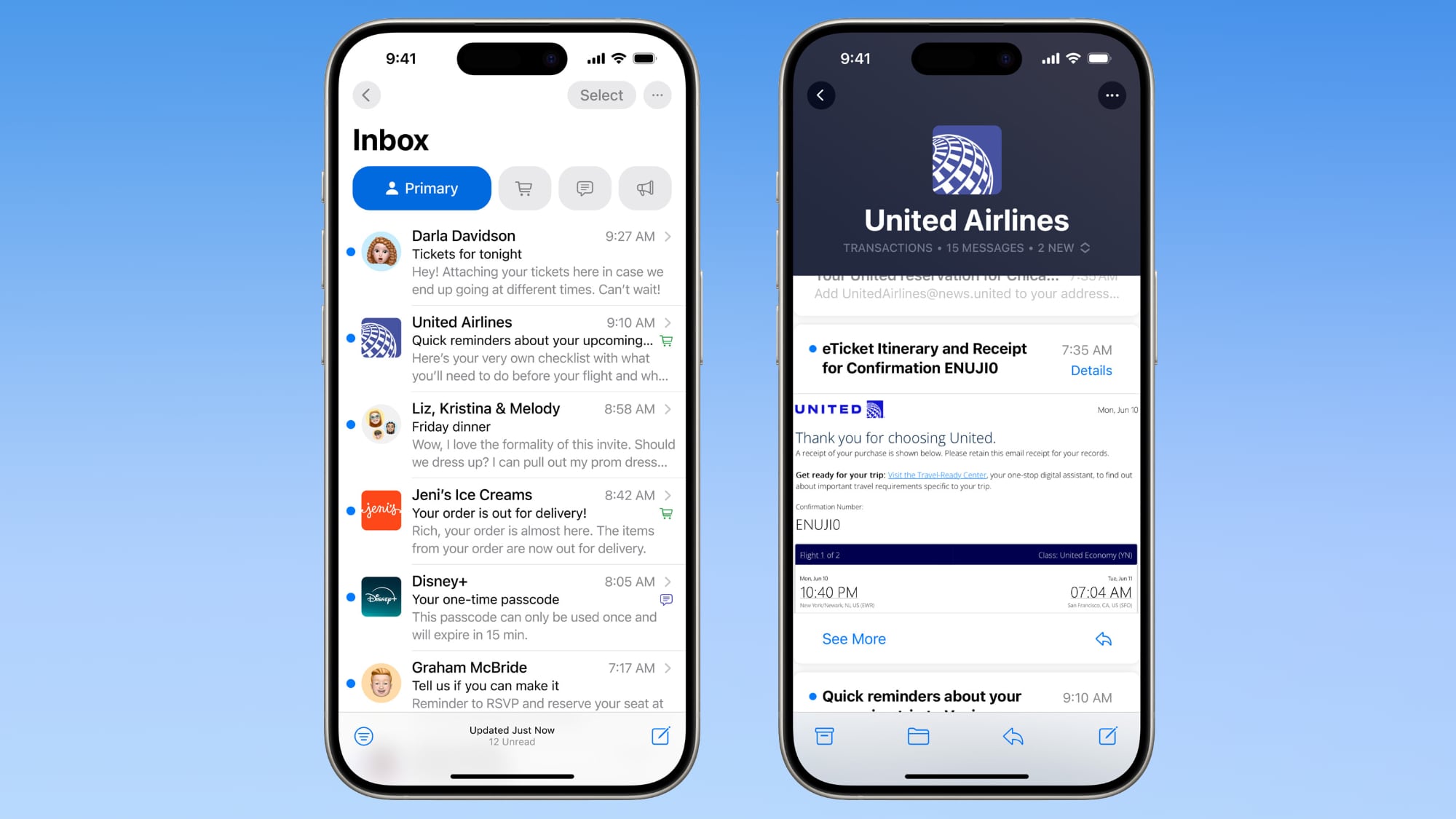


Mail Categories attempts to intelligently organize your incoming emails into different sections. Important emails are shown in a “Primary” category, with orders, newsletters, social notifications, and deals organized into three other sections.

The “Transactions” section includes receipts, orders, and deliveries, and aims to make it easy to find orders that you’ve placed and shipping information for those orders. Meanwhile, the “Updates” section includes newsletters, alerts for things like doctor’s appointments and correspondence, and other subscription emails. Lastly, Apple’s “Promotions” category includes special offers and deal emails.

Note that even if an email would normally fall into Transactions, Updates, or Promotions, it will also appear in your Primary inbox if it contains time-critical information. On devices that support Apple Intelligence, the system goes a step further by highlighting priority emails that require action or have deadlines.

Mail Categories: Why You Might Want to Revert

The new Categories view, while helpful for some, might not suit your email management style. Perhaps you prefer seeing all emails in chronological order, or have your own organization system. Or maybe you just want fast access to all your emails without switching between categories. On iPhone and iPad, you can swipe left across the categories to switch to an “All Mail” view (the same option can be found on Mac to the right of the category buttons) but what if you want to remove the categories completely?

How to Return to List View in Apple Mail

Categories is the default view after updating to the new software. Fortunately, Apple makes it simple to switch back to the traditional list view. Here’s how it’s done:

  1. Open the Mail app on your iPhone, iPad, or Mac.
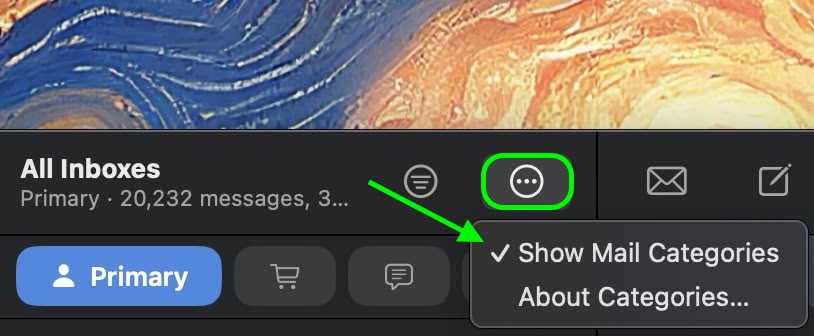
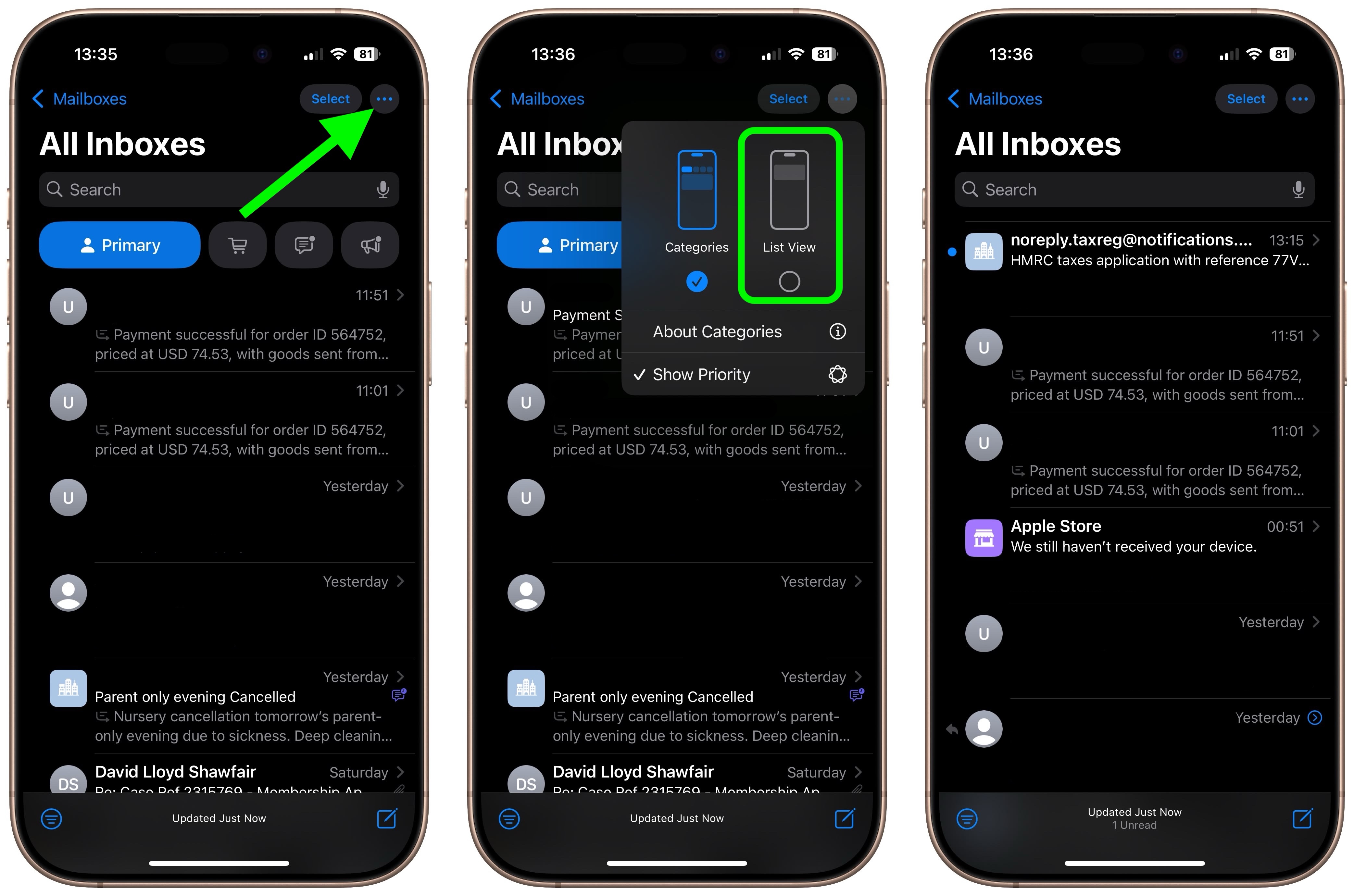
  2. On iPhone/iPad, tap the More button (three dots) in the upper right corner of your inbox. On Mac, you can find the More button at the top of the inbox view.
    mail

  3. On iPhone/iPad, select List View from the pop-up menu. On Mac, click Show Mail Categories to uncheck it.
mail

Once you switch to List View, your inbox will return to showing all emails in chronological order, just as it did before. The change takes effect immediately. While categorization is not perfect, it’s likely something that Apple will improve over time. You can always switch back to Categories view using the same menu if you want to try it again later.

Note: If you’re using an iPhone/iPad that supports Apple Intelligence, you’ll see an additional option in the More menu for priority messages. This option won’t appear on devices without Apple Intelligence support. The More menu also has an “About Categories” section where you can see how your messages have been categorized over the course of the last week, but there is no option to tell the Mail app if you believe an email has been put into the wrong category.
This article, "How to Turn Off Apple Mail Categories" first appeared on MacRumors.com

Discuss this article in our forums

Read More

Sorties cinéma du 2 avril : « Natacha (presque) hôtesse de l’air », « Lads »… Les films à voir cette semaine (ou pas) – Le Parisien

  1. Sorties cinéma du 2 avril : « Natacha (presque) hôtesse de l’air », « Lads »… Les films à voir cette semaine (ou pas)  Le Parisien
  2. “Au pays de nos frères” : en Iran, une famille afghane entre souffrances et non dits dans un film puissant  Télérama
  3. Deux sœurs, Fanon, The Grill… Les tops et les flops ciné de la semaine  lejdd.fr
  4. « Deux sœurs », « Natacha (presque) hôtesse de l’air »… Les films à voir (ou pas) cette semaine  Le Nouvel Obs
  5. “Jeunesse”, “Deux sœurs”, “Ce n’est qu’un au revoir”… Voici les sorties de la semaine !  Les Inrocks
Read More

OnePlus posts an April 1 joke video with an actual 13T teaser

OnePlus posted a video introducing its new product, the OnePlus Hammer. The device can transform objects through quantum rearrangement and create new products. If you haven’t caught it by now, it’s an April Fools’ joke. The host of the faux event transformed himself into a “small and powerful device” called the OnePlus 13T. This way, the company basically confirmed the new device and said we would see it this month. OnePlus initially claimed there would be no more T products, as they were “diluting the flagship portfolio,” and we haven’t seen one since August 2022. Apparently, this…

Read More

Samsung’s mobile chief just got a much larger responsibility

Samsung’s current mobile chief, TM Roh, will now lead the entire devices and appliances division. Last week, JH Han, the previous head of Samsung DX (Devices and Digital Appliances business), died due to a heart attack. Today, Samsung announced that TM Roh will now take JH Han’s position. TM Roh takes the place of JH […]

The post Samsung’s mobile chief just got a much larger responsibility appeared first on SamMobile.

Read More

Test du TV LG OLED65C5 : un milieu de gamme dans la continuité – Frandroid

  1. Test du TV LG OLED65C5 : un milieu de gamme dans la continuité  Frandroid
  2. Test LG 65G5 : un des meilleurs TV Oled, tout simplement  Les Numériques
  3. LG G5 de 48″ à 97″ : les meilleurs TV Oled du monde 2025 ?  AVcesar
  4. TV QNED 2025 : LG muscle ses gammes LCD et MiniLED, et on connaît déjà les prix  Clubic
  5. Test LG 65C5 : le téléviseur Oled qui coche (presque) toutes les cases, à prix canon  Les Numériques
Read More

La série «Adolescence» prescrite aux élèves du Royaume-Uni contre la radicalisation en ligne et la misogynie – Libération

  1. La série «Adolescence» prescrite aux élèves du Royaume-Uni contre la radicalisation en ligne et la misogynie  Libération
  2. La série Adolescence, qui fait un carton sur Netflix, s’invite à Downing Street et dans les écoles britanniques  Le Figaro
  3. Netflix : de quoi parle “Adolescent”, la nouvelle série phénomène produite par Brad Pitt  RTL.fr
  4. “Aucune partie de cette histoire n’est basée sur un fait réel” : Le co-créateur d'”Adolescence” (Netflix) dément une fake news “absurde” relayée par Elon Musk  puremedias
  5. La série “Adolescence” va être diffusée dans tous les collèges et lycées du Royaume-Uni  BFMTV
Read More