Apple Releases iOS 18.4.1 With Bug Fixes

Apple today released iOS 18.4.1 and iPadOS 18.4.1, minor updates to the iOS 18 and iPadOS 18 operating systems that came out last September. iOS 18.4.1 and iPadOS 18.4.1 come two weeks after the launch of iOS 18.4 and iPadOS 18.4.


The new software can be downloaded on eligible iPhones and iPads over-the-air by going to Settings > General > Software Update.

There have been complaints about issues with CarPlay and deleted apps being restored, and iOS 18.4.1 includes several bug fixes. According to Apple’s release notes, the update includes bug fixes and security updates. It addresses an issue that could cause wireless ‌CarPlay‌ not to work in select vehicles.

Apple is already testing iOS 18.5 and iPadOS 18.5, updates that are available in a beta capacity right now. iOS 18.5 and iPadOS 18.5 will likely launch in May.
This article, "Apple Releases iOS 18.4.1 With Bug Fixes" first appeared on MacRumors.com

Discuss this article in our forums

Read More

Apple Releases visionOS 2.4.1

Apple today released visionOS 2.4.1, a minor update to the visionOS 2 operating system that came out in September. visionOS 2.4.1 comes two weeks after the launch of visionOS 2.4.


visionOS 2.4.1 can be downloaded on all Vision Pro headsets by navigating to the Settings app, selecting the General section, and choosing the Software Update option.

To install an update, the Vision Pro headset needs to be removed, and there is a software progress bar available on the front EyeSight display.

According to Apple’s release notes, visionOS 2.4.1 includes bug fixes and security updates, and the software is recommended for all users.

More information on the Vision Pro and ‌visionOS 2‌ can be found in our roundup.

Related Roundup: visionOS 2
Related Forum: Apple Vision Pro

This article, "Apple Releases visionOS 2.4.1" first appeared on MacRumors.com

Discuss this article in our forums

Read More

Apple Releases tvOS 18.4.1

Apple today released tvOS 18.4.1, a minor update to the tvOS 18 operating system that came out last September. tvOS 18.4.1 comes two weeks after Apple released tvOS 18.4, and it is available for the Apple TV 4K and ‌Apple TV‌ HD models.


tvOS 18.4.1 can be downloaded using the Settings app on the ‌‌Apple TV‌‌. Open up Settings and go to System > Software Update to get the new software. ‌‌Apple TV‌‌ owners who have automatic software updates activated will be upgraded to tvOS 18.4.1 automatically.

Apple shares full release notes for tvOS in its tvOS support document, which is updated after each new version of tvOS comes out.

Apple has also released a new version of the HomePod Software 18.4.1 for the ‌HomePod‌ and HomePod mini. ‌HomePod‌ software is based on tvOS.

Related Roundup: Apple TV
Buyer’s Guide: Apple TV (Don’t Buy)

This article, "Apple Releases tvOS 18.4.1" first appeared on MacRumors.com

Discuss this article in our forums

Read More

Apple highlights four short films shot on iPhone 16 Pro Max and edited on MacBook Pro

The Mumbai Academy of the Moving Image (MAMI) has selected four up-and-coming creators for the second MAMI Select: Filmed on iPhone Program. This year, creators from MAMI will film on the iPhone 16 Pro Max and will edit the footage on M4 Max-powered MacBook Pros. The inaugural edition of MAMI Select was a success with two of its short films earning accolades from the 2025 Critics’ Choice Awards India: Best Short Film, Best Director (Short Film) and Best Writing (Short Film). The four filmmakers picked for this year’s MAMI Select are Amrita Bagchi, Rohin Raveendran Nair, Chanakya Vyas…

Read More

Samsung’s fortunes set to turn as HBM4 yields hit 40%

Samsung’s chip division has lost billions of dollars as it fell behind SK Hynix in the high-bandwidth memory segment. SK Hynix has emerged as NVIDIA’s largest supplier of HBM3 modules used in the latter’s AI accelerators that are in high demand. Micron follows in second place while Samsung has still not clear NVIDIA’s quality checks […]

The post Samsung’s fortunes set to turn as HBM4 yields hit 40% appeared first on SamMobile.

Read More

Reveal Hidden Folder Sizes in macOS Finder With These Tricks

When using macOS Finder in List view, you’ll see the sizes of individual files – but not folders.

Instead, folders show a pair of dashes (–) in the Size column. macOS skips calculating folder sizes by default to keep List view performance fast, especially in directories with many nested files. But if you want to keep an eye on folder sizes in certain locations, or even globally, there are a few ways to do it. Here’s how.
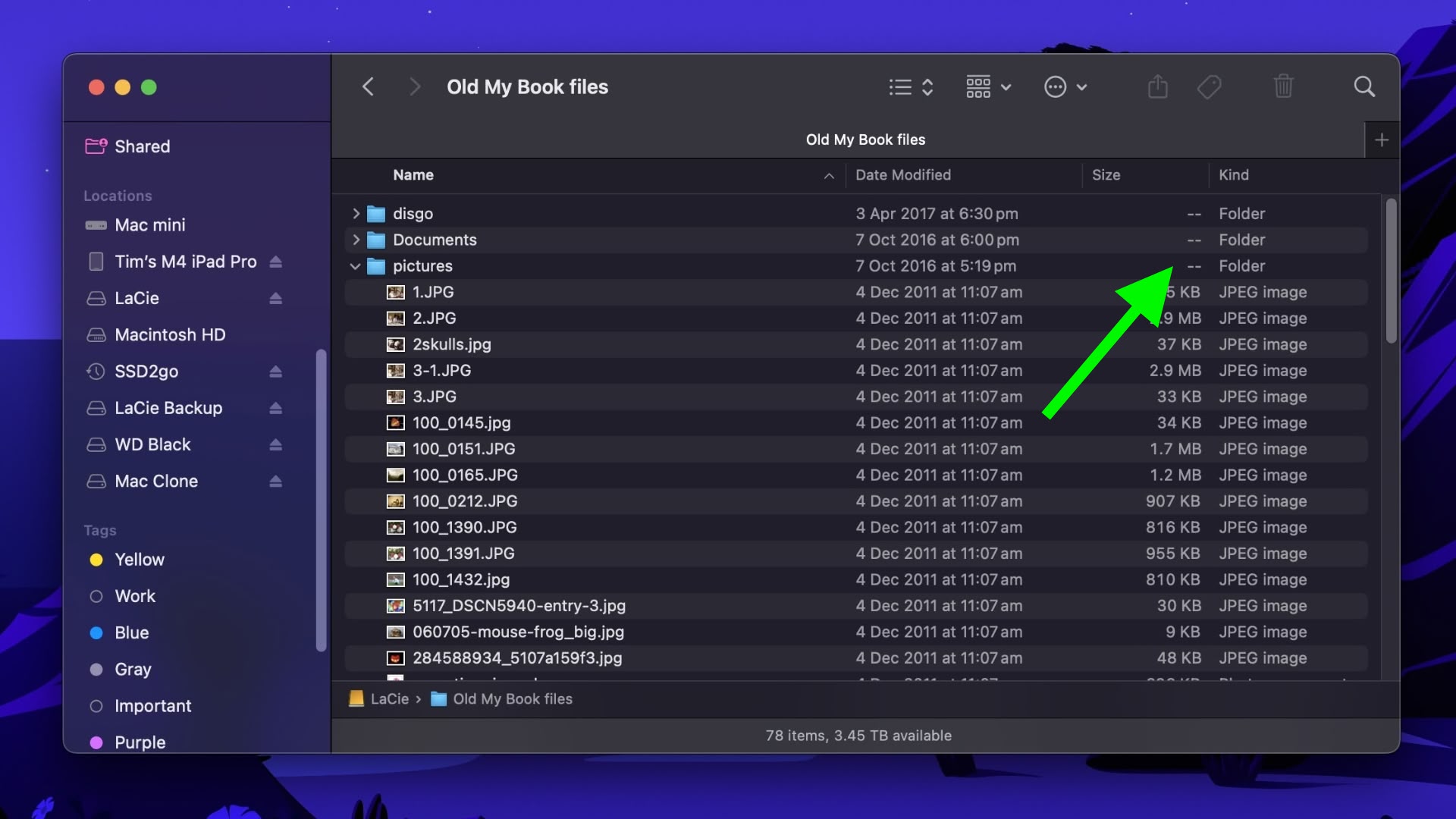


What if you want to use List view and still keep an eye on the size of a handful of folders in a specific location – in Documents, for instance, or in a directory synced to a cloud storage service? Or what if you have a super-fast SSD that can handle the pressure of calculating the size of lots of folders on the fly? Thankfully, there are several ways to make Finder show folder sizes, even in List view.

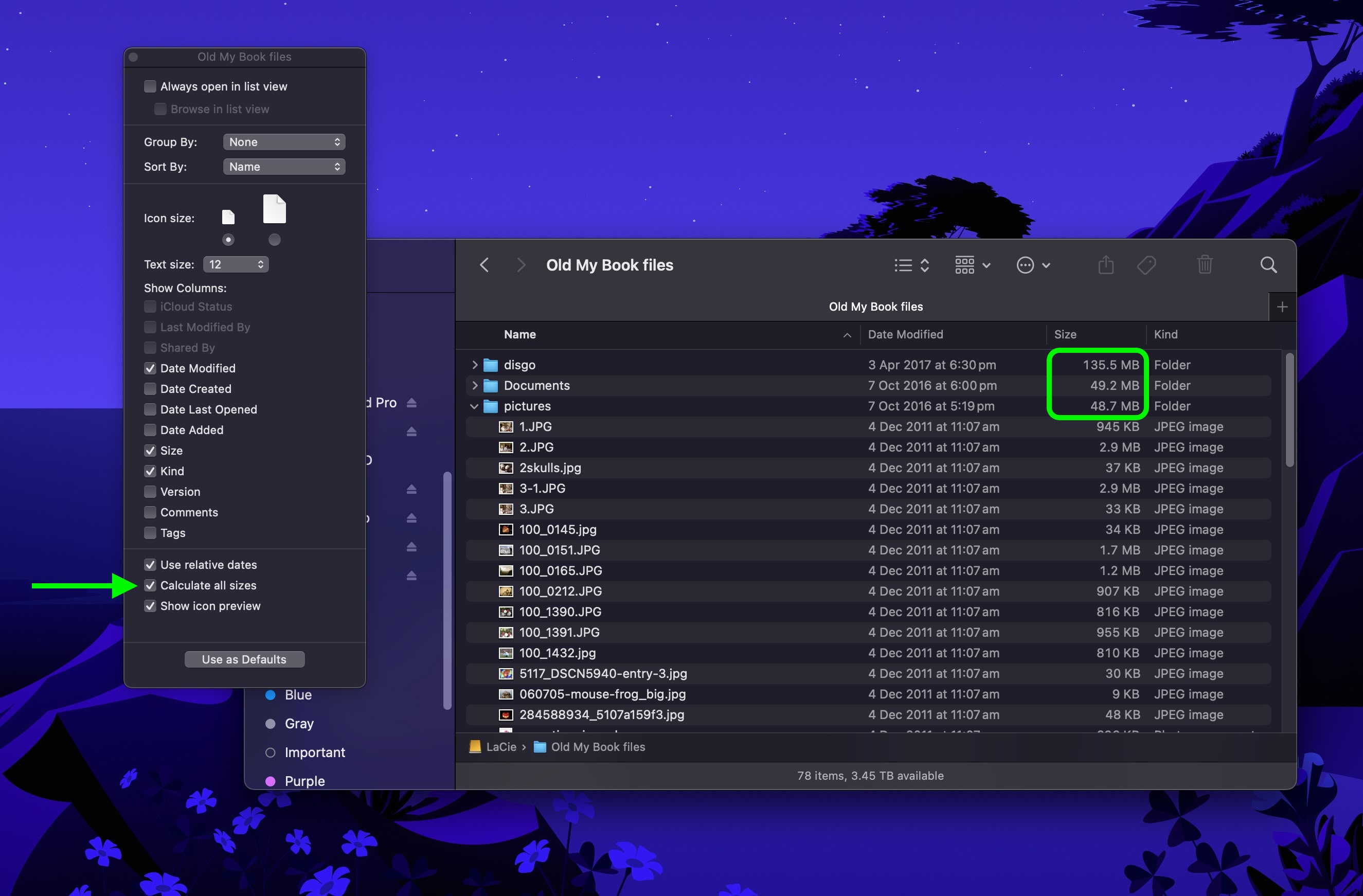
Enable Calculate All Sizes
finder

Open the folder in question, select View ➝ Show View Options from the menu bar or press the keys Command+J, and check Calculate All Sizes. Finder will now remember your viewing preference for that particular location only.

Turn On Preview Panel

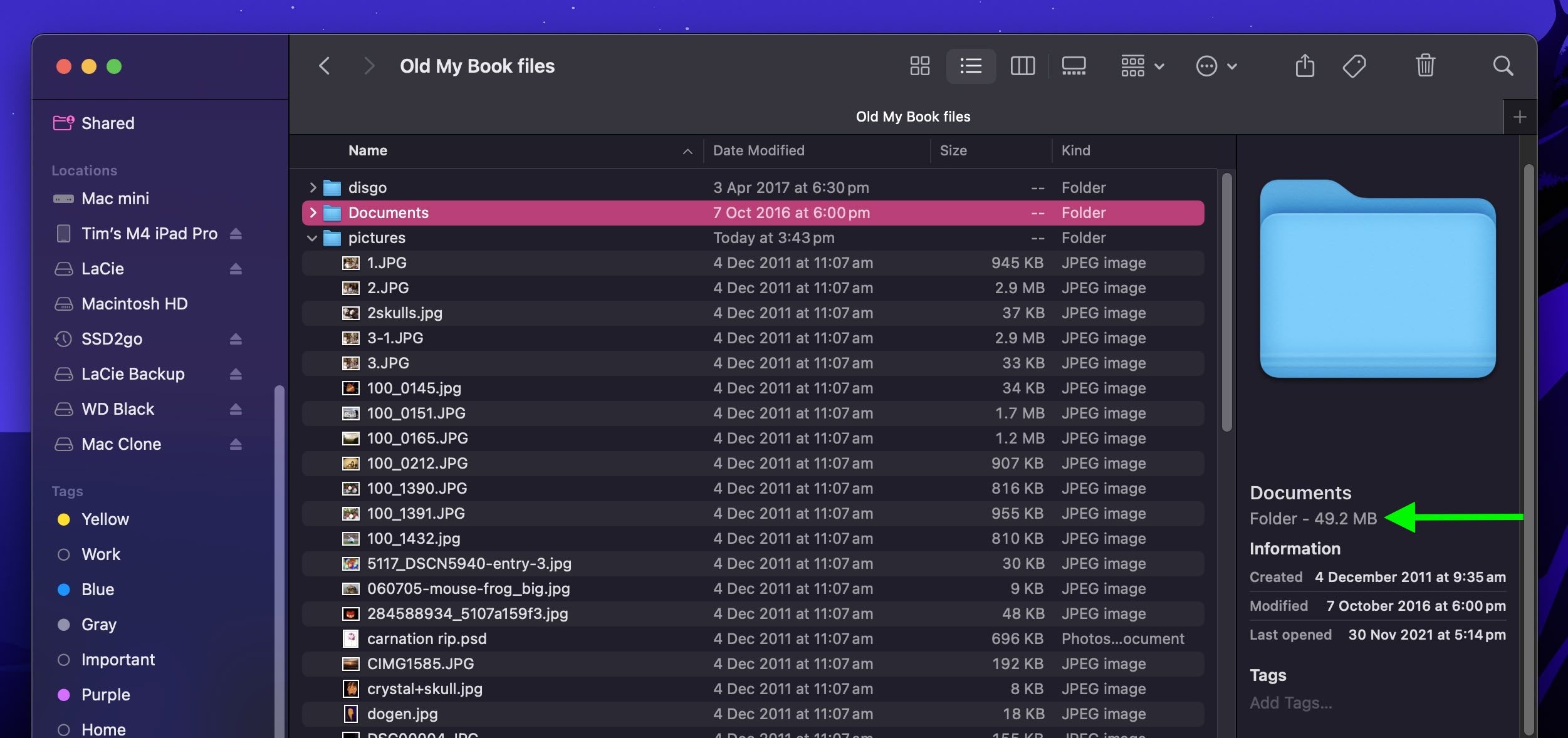
If you’re looking for a more global solution for keeping tabs on folder sizes that will work in any Finder view mode, you might consider enabling the Preview panel. To do this, open a Finder window and select the menu bar option View ➝ Show Preview, or press the keys Shift+Command+P.
finder

In the Preview panel, the size of the selected folder always appears immediately below the folder name. If this is the only folder information you want to see in the Preview panel, you can select the menu bar option View ➝ Show Preview Options and uncheck all other metadata options.

Use Get Info

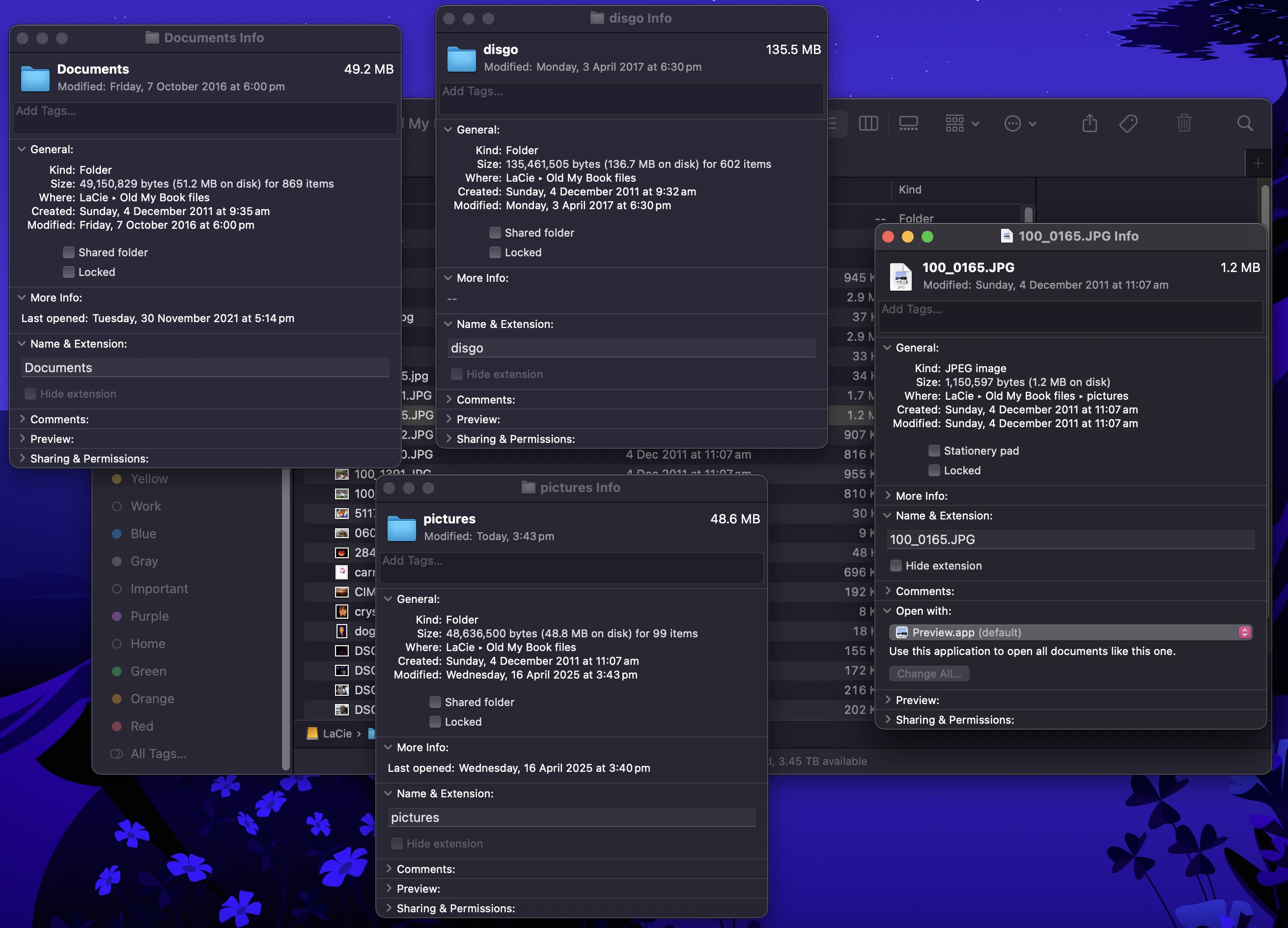
Of course, you may find that relying on the Preview panel to keep a check on individual folder sizes isn’t an ideal use of Finder window space. This is where the menu bar option File ➝ Get Info (or key combo Command+I) can come in helpful. Opening a separate Get Info panel lets you see the size of the item in question, regardless of whether it’s a file or a folder.
finder

The downside? Each Get Info panel is static and specific to the item selected. Opening several at once can clutter your desktop, since each new window stays open until manually closed.

Use Inspector for Live Folder Info
finder

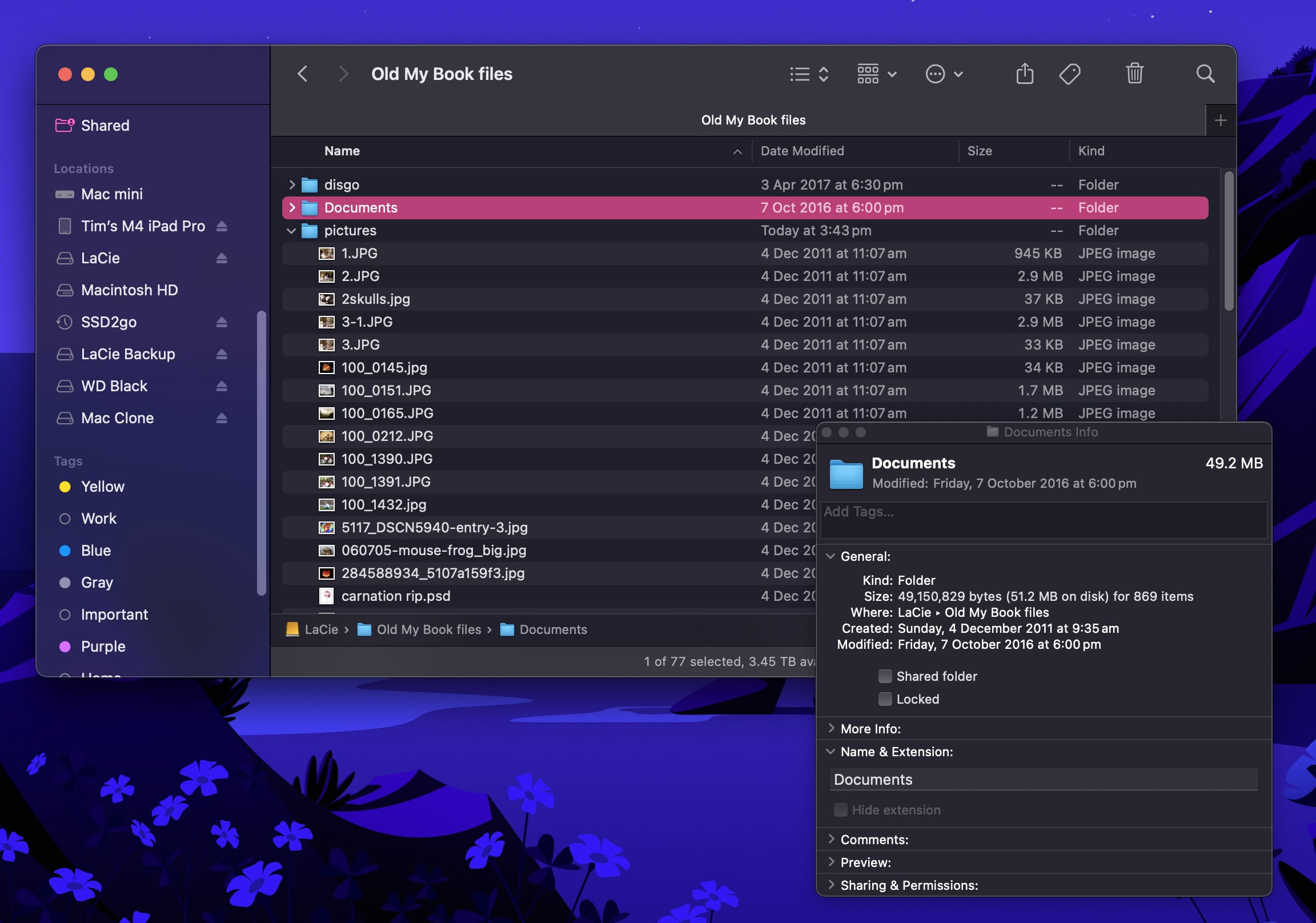
Fortunately, this inconvenience can be easily solved: Click File in the menu bar and hold the Option key, and Get Info will turn into Show Inspector. Unlike a Get Info panel, the Inspector panel is dynamically updated and will always display information for the active Finder window’s currently selected file or folder – including, of course, its size.

In summary, for casual folder-size checking, use the Preview panel. For detailed or multiple folders, enable Calculate All Sizes in View Options. And if you need real-time updates without clutter, use Show Inspector.
This article, "Reveal Hidden Folder Sizes in macOS Finder With These Tricks" first appeared on MacRumors.com

Discuss this article in our forums

Read More

There might be a different Realme GT 7 for international markets

Realme is unveiling the GT7 in China on April 23, and that phone is already confirmed to sport the latest Dimensity 9400+ SoC, and a 7,000 mAh battery with support for 100W fast wired charging. But it seems like that model will remain confined to China, while international markets are getting a different GT7, this one powered by MediaTek’s Dimensity 9300+, one generation older than the chip in the Chinese version. This one was spotted in the Geekbench database with the model number RMX5061, which was certified in Indonesia as the GT7. What’s going on here might be that the…

Read More

Google will no longer offer security updates for devices running Android 12

Every month, Google releases a security patch for Android, which contains fixes for many security issues. Until the March 2025 security patch, the brand offered these updates to Android 12 and newer versions of the OS. However, with the April 2025 security patch, the company is dropping support for Android 12 and Android 12L, and […]

The post Google will no longer offer security updates for devices running Android 12 appeared first on SamMobile.

Read More